
FIND US
Davenport, IA
4710 N Brady St
Davenport, IA 52806
Des Moines, IA
2276 NE 46th Ave
Des Moines, IA 50317
Residential Garage Door Opener Remotes, Keypads & Wall Controls
Wireless and Wired Access Controls for Residential Openers
Remotes, keypads, wall controls, and receivers are the components you interact with every time you open or close your garage door. When a remote stops working, a keypad fails to accept your code, or a wall button becomes unresponsive, the inconvenience is immediate. Barron Equipment offers replacement access controls for residential garage door openers from Genie, LiftMaster, Overhead Door, and other brands, with short lead times on most components.
-

1-Button Remote Control
Item ID: LM 371LM$34.29 Add to cart -

1-Button Remote Control
Item ID: LM 891LM$38.01 Add to cart -

Mini Universal Remote Control
Item ID: LM 374UT$52.23 Add to cart -

2-Button Universal Remote Control
Item ID: LM 380UT$42.86 Add to cart -
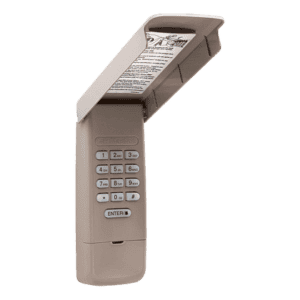
Wireless Keyless Entry System
Item ID: LM 877LM$55.68 Add to cart -

3-Button Mini Remote Control
Item ID: LM 890MAX$48.14 Add to cart -

3-Button Visor Remote Control
Item ID: LM 893MAX$48.14 Add to cart -

MAX Wireless Keyless Entry System
Item ID: LM 878MAX$58.96 Add to cart
Remote Controls
Garage door opener remotes are handheld wireless transmitters that send a coded signal to the opener’s receiver, triggering the door to open or close. Modern remotes use rolling code technology — the transmitted code changes with each press, preventing unauthorized interception and replay. Older remotes using fixed codes or DIP switch frequencies are less secure and may be worth upgrading if your opener supports a newer protocol.
Remotes are available in single-button, multi-button, and mini visor-clip configurations. Single-button remotes operate one door or gate. Multi-button remotes can control up to three separate openers or gates from a single device, which is convenient for households with multiple garage bays or a separate gate entry. Mini remotes clip to a sun visor or attach to a keychain for portability.
When a remote stops working, replace the battery before ordering a new unit — a dead battery is the most common cause of remote failure and the easiest to fix. If a fresh battery does not restore function, reprogram the remote to the opener using the learn button sequence. If the remote still fails to pair, the remote itself has likely failed and needs to be replaced. If multiple remotes stop working simultaneously, the issue is more likely the receiver or circuit board on the opener rather than the remotes themselves.
Wireless Keypads
A wireless keypad mounts outside the garage and allows entry using a numeric PIN code instead of a remote. Keypads are especially useful for family members who walk or bike home without a remote, for service providers who need temporary access, and as a backup entry method if remotes are lost or batteries die.
Most keypads communicate with the opener on the same frequency and security protocol as the remotes. Programming a PIN is done through the learn button on the opener unit, and most models allow you to set a temporary access code that expires after a set period — a practical feature for granting guest or contractor access without sharing your permanent code.
Keypad failures typically present as the unit not responding to button presses, the backlight failing, or the opener not recognizing the entered code. Weather exposure is the primary cause — keypads mounted outside are subjected to rain, humidity, temperature extremes, and UV degradation year-round. If your keypad is more than five years old and has become unreliable, a new unit usually solves the problem more reliably than troubleshooting the old one.
Wall Controls
The wall control is the wired button panel mounted inside the garage, typically near the entry door to the house. Basic wall controls have a single push button for open and close operation. More advanced panels include a light control button, a lock-out switch that disables all remotes for security, and a vacation mode that prevents the door from being opened remotely while you are away.
Wall controls connect to the opener through low-voltage wiring — usually a two-conductor bell wire that runs from the button panel to a terminal strip on the opener unit. A failed wall control may produce no response when pressed, or it may trigger the opener intermittently. Before replacing the wall control, check the wire connections at both ends — a loose terminal is a common cause of intermittent operation and is resolved by reseating the wire rather than replacing the control.
When upgrading a wall control, verify that the replacement is compatible with your opener’s communication protocol. Some newer wall controls use a digital data signal rather than a simple switch closure, and these are only compatible with openers designed to accept that signal type. Installing an incompatible wall control will produce no response from the opener.
Receivers
The receiver is the component inside the opener that picks up the wireless signal from remotes and keypads. On most residential openers, the receiver is built into the circuit board. On some models, however, the receiver is a separate module that can be replaced independently. External receivers are also available as add-on accessories to extend the range of the opener’s wireless signal or to add compatibility with remotes on a different frequency.
If all wireless controls — remotes and keypads — fail to operate the opener while the wired wall control works normally, the receiver is the likely failure point. This rules out the circuit board, motor, and safety sensors as causes, because those systems all function via the wall control. Replacing just the receiver module, where available, is significantly less expensive than replacing the entire circuit board.
Compatibility and Security Protocols
Not all remotes and keypads work with all openers, even within the same brand. Garage door opener manufacturers use different wireless frequencies and security protocols across their product lines. Genie openers use the Intellicode system. LiftMaster and Chamberlain use Security+ and Security+ 2.0. Overhead Door uses CodeDodger technology. A remote designed for one protocol will not communicate with an opener on a different protocol.
Universal remotes are available and can be programmed to work with multiple brands and frequencies. However, universal remotes may not support every feature of the opener — such as light control or lock-out — that a brand-specific remote provides. For full functionality, a manufacturer-matched remote is the recommended choice.
Why did my garage door opener remote stop working?
The most common cause is a dead battery — replace it first before pursuing other troubleshooting. If the remote still fails with a fresh battery, try reprogramming it to the opener using the learn button. If it will not pair, the remote may have failed internally. If multiple remotes stop working at the same time, the issue is likely the opener’s receiver or circuit board rather than the remotes.
Can I add extra remotes to my garage door opener?
Yes. Most residential openers can store multiple remote codes in their memory. The exact number varies by model — typically between four and twenty devices. To add a remote, press the learn button on the opener, then press the button on the new remote within 30 seconds. The opener will store the new code and respond to the remote going forward. Consult your opener’s manual for the specific learn button location and programming sequence.
How do I reset my garage door opener keypad code?
The process varies by brand, but generally involves pressing the learn button on the opener unit, entering a new PIN on the keypad, and pressing the enter or send button within a set time window. Some models require you to clear all existing codes before programming a new one, while others allow adding new codes without erasing the old ones. If you have lost your existing code and cannot access the learn button, consult the opener’s manual or contact us for model-specific instructions.
What is rolling code technology and why does it matter?
Rolling code technology generates a new encrypted code every time you press the remote button. The opener and remote stay synchronized, and each code is used only once. This prevents code grabbing — a technique where someone intercepts your remote’s signal and replays it later to open your door. Older fixed-code remotes transmit the same signal every time, making them vulnerable to this attack. If your opener and remotes still use a fixed code system, upgrading to rolling code remotes and a compatible receiver improves your garage security significantly.
Selection Assistance
Choosing the right remote, keypad, or wall control depends on your opener’s brand, model, and security protocol. If you are unsure which accessories are compatible with your system, contact Barron Equipment with your opener brand and model number. We will confirm which controls work with your unit and provide lead time and pricing. For customers in Iowa and surrounding states, our technicians can install and program new access controls on-site, including pairing remotes, setting keypad codes, and configuring wall control features.